![BinSentry_HorizontalComplete_White.png]](https://knowledge.binsentry.com/hs-fs/hubfs/BinSentry_HorizontalComplete_White.png?height=28&name=BinSentry_HorizontalComplete_White.png)
In order to make sure ProSense HD inventory data matches the way you manage your bins we have introduced the ability to set any ProSense HD bin to reflect a Bushel calculation. With this update, you can now display ProSense HD inventory in bushels as a bin-level setting.
Bushels are commonly used for large commodity and storage bins to align with grain markets, contracts, and trading, while smaller ingredient and load-out bins are often managed in tons or pounds. Your sitewide inventory unit settings remain unchanged, and you can now choose bushels for specific bulk storage bins when that is the unit your team uses.
To enable bushels on a bin, follow these simple steps:
1. Find and open the bin page for the bin you want to display in bushels
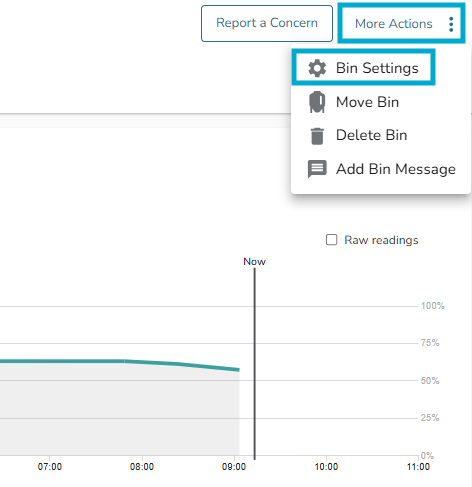
2. Click the “More Actions” button in the top left, then select “Bin Settings”
3. Within “Update Bin Material,” click the dropdown below “Preferred Unit” and select “Bushels” 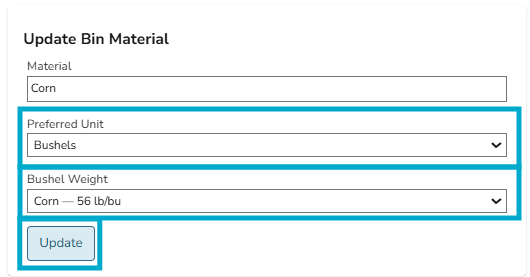
4. Select the “Bushel Weight” that matches the ingredient in your bin
5. Click “Update” to save bushels as the preferred unit for that bin
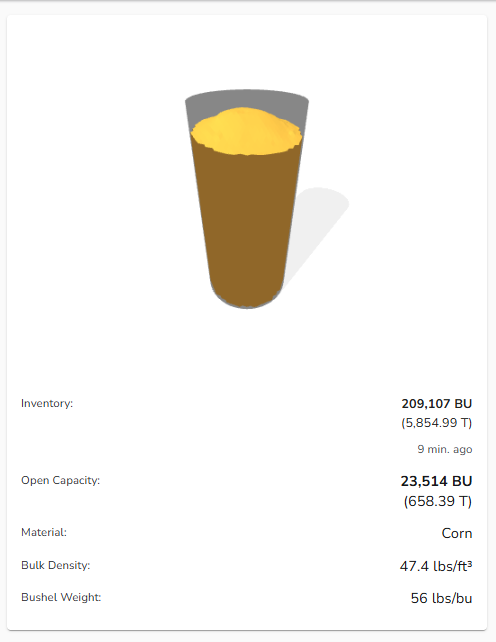
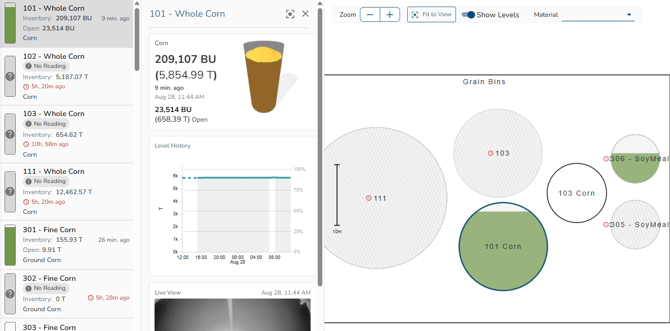
Once enabled, bushels will appear on all screens where that bin’s inventory is displayed, often with your current sitewide inventory unit shown beside it in brackets.
Notes:
- We currently support the main USDA-defined bushel weights:
-
- Corn, Soybeans, Wheat, Oats, Barley, Rye, Canola, Flaxseed/Rapeseed, Rice, & Sorghum/Milo
- Bushels are set per bin and are not available as a sitewide user preference